
ZipCaptions to Twitch: Live Captions in Your Chat
Zip Connect Chrome Extension
Are you tired of missing out on crucial dialogue or needing to switch between windows to follow live captions while watching a Twitch stream? The Zip Captions to Twitch extension is your solution!
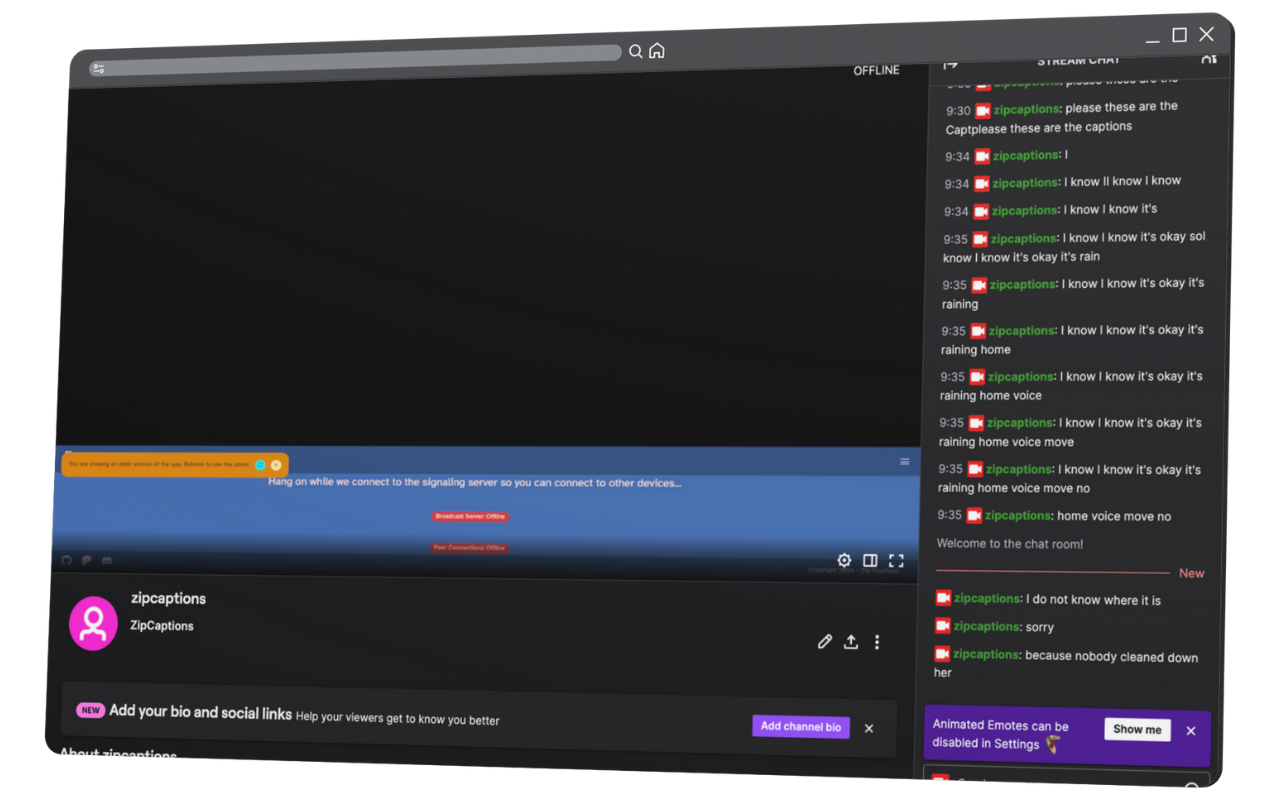
Key Capabilities
Engineered for effortless accessibility, reliability, and speed.
Real-time Caption Relay
Captures live captions from zipcaptions.app as they appear, translating spoken words into immediate stream subtitles.
Seamless Twitch Integration
Automatically pastes captions directly into your chosen Twitch stream's chat without needing bot tokens or third-party servers.
Simple Control
An intuitive popup with a 'Start/Stop' button gives you full control over when captions are actively being relayed.
Enhanced Accessibility
Makes live Twitch content more accessible to deaf or hard-of-hearing viewers, or anyone who prefers reading live captions.
Private Captions
Utilizes your personal ZipCaptions feed, ensuring you see and relay only the captions you intend.
For Viewers & Creators
Perfect for viewers who rely on captions, content creators offering additional accessibility, or anyone catching every detail of a broadcast.
Live Captions Directly in Your Twitch Chat
This powerful yet simple extension seamlessly brings live captions from zipcaptions.app directly into your Twitch chat experience. Enhance accessibility, improve comprehension, and ensure you don't miss a single word of your favorite live content.
Perfect for viewers who rely on captions, content creators who want to offer additional accessibility, or anyone who simply wants to ensure they catch every detail of a live broadcast.
How to Use Zip Connect
Open Twitch Stream
Navigate to your Twitch stream dashboard or the channel page where you want captions to appear.
Start Relaying
Click the Zip Connect extension icon, hit Start, and watch live captions post into chat in real time!
At a Glance
Good to know before you start
Relays live captions directly into any Twitch stream chat you participate in or moderate.
Takes under 60 seconds to get going—simply launch Zip Captions and toggle Start in the extension popup.
You decide exactly when captions are posted, with instant pause controls whenever you need a break.
Runs quietly in your browser without eating up GPU or CPU resources while gaming or streaming.
Solving Real Classroom, Venue & Production Hurdles
Real-World Questions & Practical Answers
Why do mobile Twitch viewers miss closed captions, and why are third-party Twitch caption bots so risky to set up?
Native video player closed captions often fail to appear on mobile apps, smart TVs, or VOD replays, while traditional chat bots require handing over OAuth tokens to external servers. Zip Connect bridges your open Zip Captions tab directly into your open Twitch Creator Dashboard or chat tab locally in your browser—so every viewer on any device can read spoken dialogue right in chat with zero external bot tokens.
Will posting live captions into Twitch chat get my account rate-limited or flood out viewer messages?
Zip Connect batches spoken phrases into clean, readable chat intervals rather than spamming single words, keeping your stream chat readable and within Twitch's normal broadcaster message limits while running with near-zero CPU/GPU overhead.
Make your Twitch stream accessible to everyone
Level up your live stream with real-time chat captions that engage every single viewer in your community.